DeskScapes: Difference between revisions
Jump to navigation
Jump to search
Island Dog (talk | contribs) (Created page with " {{MainTemplate | welcome = link=|<span title="Stardock DeskScapes Wiki"></span> | about_title = About DeskScapes | about_content = Easily crea...") |
No edit summary |
||
| (30 intermediate revisions by 2 users not shown) | |||
| Line 1: | Line 1: | ||
{{MainLightTemplate | |||
{{ | | welcome = [[File:ds2026-header.jpg|link=|<span title="Stardock DeskScapes Wiki"></span>]] | ||
| welcome = [[File: | |||
| about_title = About DeskScapes | | about_title = About DeskScapes | ||
| about_content = | | about_content = | ||
Personalize your desktop with generated wallpapers, animations, and video. | |||
<h2 style="font-family: sans-serif; font-size: 1.5em; margin-top:0.875em"> Key Features </h2> | <h2 style="font-family: sans-serif; font-size: 1.5em; margin-top:0.875em"> Key Features </h2> | ||
* | * Playlists – Picking a single background can be tough but with Playlists, you can create a collection of your favorite images. | ||
* | * Generation – Easily create images using your local hardware, upscale an existing image to 4k, or easily apply an entirely new artistic style to any wallpaper in your collection. | ||
* | * Effects – Apply a wide range of special effects to your background, including color filters, textures, blurs, and over 120 effects to mix and match. | ||
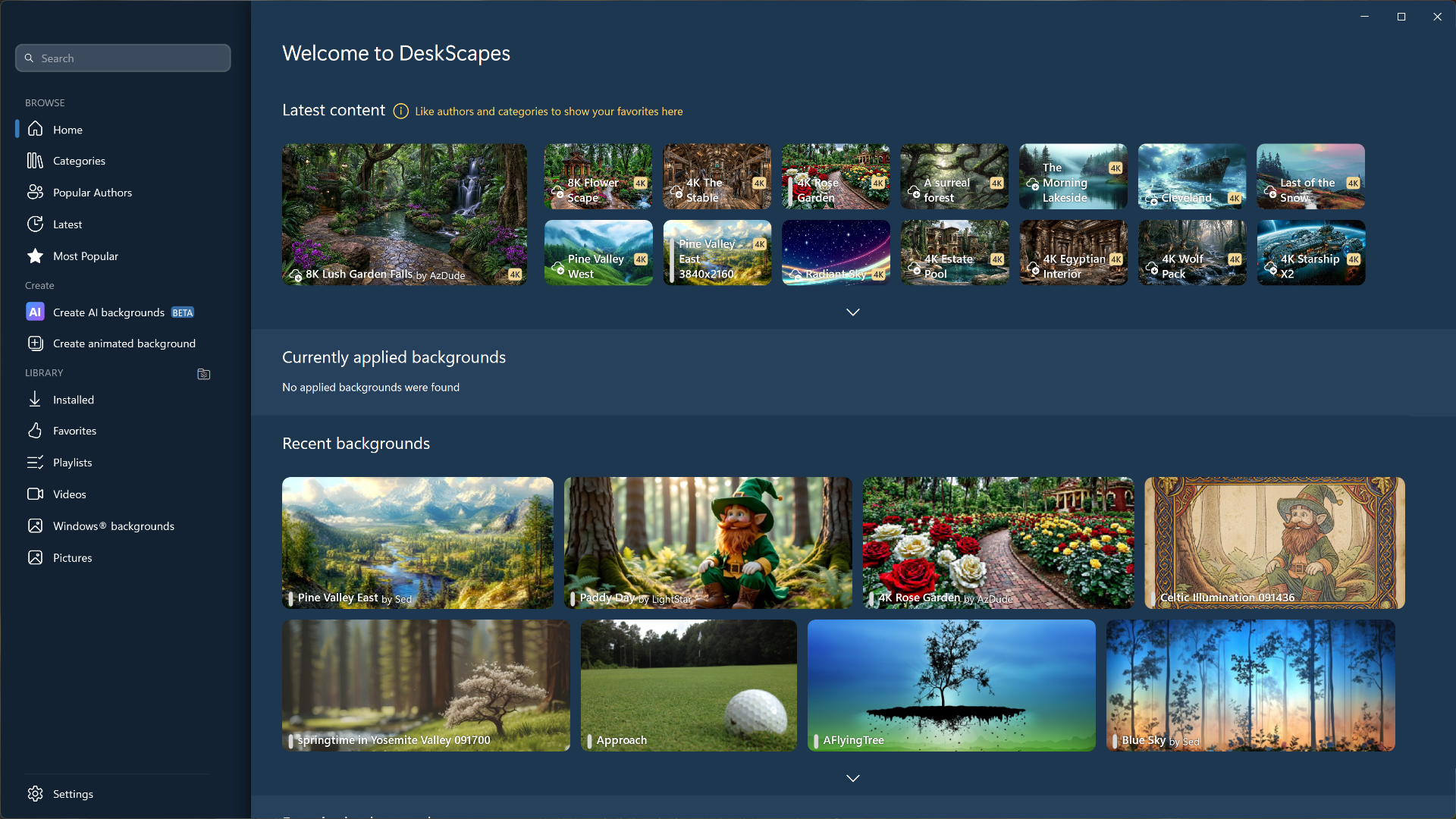
* | * Organization – DeskScapes 2026 is built from the ground-up to make it the easiest way to manage your desktop wallpapers, animated backgrounds, and to create new backgrounds. | ||
* Configuration – DeskScapes 2026's user-friendly design makes it easy to find your wallpapers, make adjustments, and organize them for future use. | |||
<h2 style="font-family: sans-serif; font-size: 1.5em; margin-top:0.875em"> Features </h2> | |||
===Turn your static desktop into a vibrant canvas.=== | |||
Turn your static desktop into an animated work of art. | |||
*'''DeskScapes makes it easy to animate your desktop'''<br/> | |||
<p style="margin: 0 0 0 22px;">Turn any image or video into a background for your PC.</p> | |||
< | *'''Bring images to life'''<br/> | ||
<p style="margin: 0 0 0 22px;">Enhance static photos with over 60 special effects.</p> | |||
[[File:ds2026-home-L1A.png|400px]] | |||
=== | ===Creativity made easy with all the tools you need.=== | ||
Create backgrounds or browse community designs. | |||
*'''Local Image Generation Made Easy'''<br/> | |||
<p style="margin: 0 0 0 22px;">Easily create unique background images on your device using your GPU, no tokens or internet required.</p> | |||
*'''Add a new artistic style to any image with AI Restyle'''<br/> | |||
<p style="margin: 0 0 0 22px;">Choose from dozens of styles to add a new design to any existing image or easily upscale it to 4k.</p> | |||
[[File:ds2026-home-L2.png|400px]] | |||
| sections_title = Featured | |||
===Organize your creations with an intuitive interface.=== | |||
DeskScapes makes it easy to manage your backgrounds. | |||
*'''Create playlists of your favorite backgrounds'''<br/> | |||
<p style="margin: 0 0 0 22px;">Can't choose a favorite background? Create a playlist to cycle through your favorite designs.</p> | |||
*'''Organized to perfection'''<br/> | |||
<p style="margin: 0 0 0 22px;">Never lose another wallpaper again as DeskScapes makes it easy organize your backgrounds.</p> | |||
[[File:ds2026-home-L3.png|400px]] | |||
| sections_title = Featured Screenshot | |||
| sections_content = | | sections_content = | ||
<span style="margin-left:-0.4em;">[[File: | <span style="margin-left:-0.4em;">[[File:ds2026-release-ss01-thumb.jpg|319px|link=https://www.stardock.com/products/deskscapes/deskscapes2026/images/screenshots/release/ds2026_release_ss01.png]]</span> | ||
| articles_title = Important Pages | | articles_title = Important Pages | ||
| articles_content = | | articles_content = | ||
<h2 style="font-family: sans-serif; font-size: 1.125em; margin-top:0.875em"> Media </h2> | <h2 style="font-family: sans-serif; font-size: 1.125em; margin-top:0.875em"> Media </h2> | ||
*[[DeskScapes Screenshots|Screenshots]] | *[[DeskScapes Screenshots|Screenshots]] | ||
<h2 style="font-family: sans-serif; font-size: 1.125em; margin-top:0.875em"> DeskScapes Resources</h2> | <h2 style="font-family: sans-serif; font-size: 1.125em; margin-top:0.875em"> DeskScapes Resources</h2> | ||
*[https://www.wincustomize.com/explore/DeskScapes | *[https://www.wincustomize.com/explore/dream DeskScapes wallpaper downloads] | ||
*[[DeskScapes History|History of DeskScapes]] | *[[DeskScapes History|History of DeskScapes]] | ||
*[ | *[https://www.stardock.com/products/deskscapes/history DeskScapes Changelog] | ||
*[[DeskScapes System Requirements|System Requirements]] | *[[DeskScapes System Requirements|System Requirements]] | ||
<h2 style="font-family: sans-serif; font-size: 1.125em; margin-top:0.875em"> Official Pages </h2> | <h2 style="font-family: sans-serif; font-size: 1.125em; margin-top:0.875em"> Official Pages </h2> | ||
*[https://www.stardock.com/products/ | *[https://www.stardock.com/products/deskscapes/ DeskScapes Website] | ||
*[https://forums.stardock.com/forum/ | *[https://forums.stardock.com/forum/432 DeskScapes Forums] | ||
*[https://store.steampowered.com/app/1027220/DeskScapes/ DeskScapes on Steam] | |||
*[https://www.facebook.com/official.stardock/ Stardock Facebook] | *[https://www.facebook.com/official.stardock/ Stardock Facebook] | ||
*[https://twitter.com/stardock Stardock Twitter] | *[https://twitter.com/stardock Stardock Twitter] | ||
Latest revision as of 14:58, 21 May 2026
 |
Featured Screenshot
Important Pages |
About DeskScapesPersonalize your desktop with generated wallpapers, animations, and video. Key Features
FeaturesTurn your static desktop into a vibrant canvas.Turn your static desktop into an animated work of art.
Turn any image or video into a background for your PC.
Enhance static photos with over 60 special effects.
Creativity made easy with all the tools you need.Create backgrounds or browse community designs.
Easily create unique background images on your device using your GPU, no tokens or internet required.
Choose from dozens of styles to add a new design to any existing image or easily upscale it to 4k.
Organize your creations with an intuitive interface.DeskScapes makes it easy to manage your backgrounds.
Can't choose a favorite background? Create a playlist to cycle through your favorite designs.
Never lose another wallpaper again as DeskScapes makes it easy organize your backgrounds.
|